


Geometry Jump 3D
3.6179.00 Reviews
App Specs
- Version
- 1.1.4
- Updated On
- License
- Free
- Downloads
- 1,000,000+
- Developer
- F4ntom Games
- Categories
- Music
- Platform
- Android
Screenshots
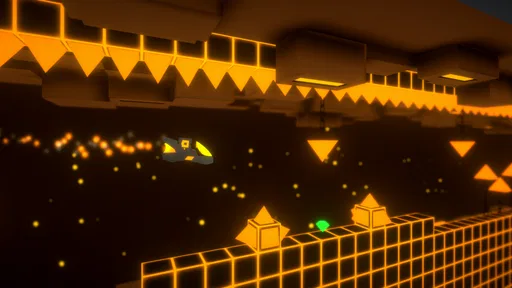
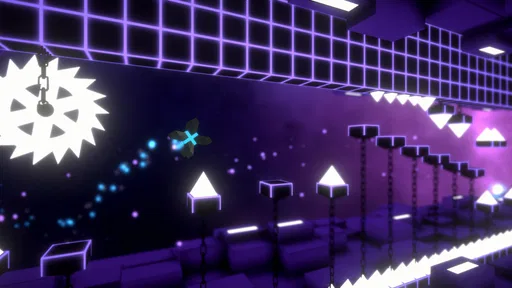
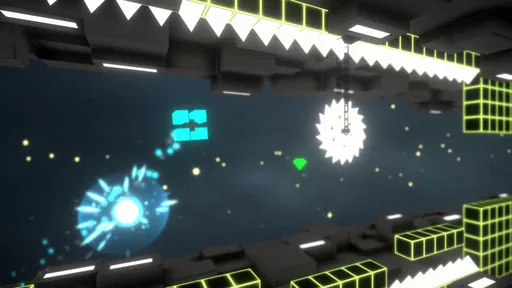
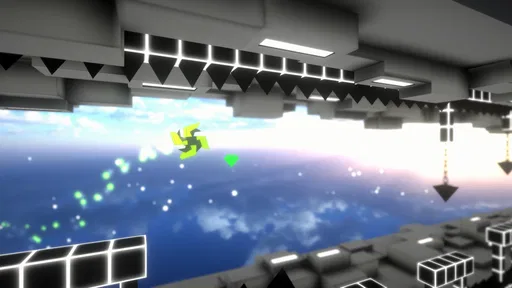
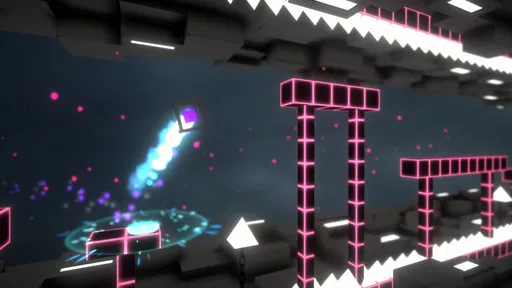
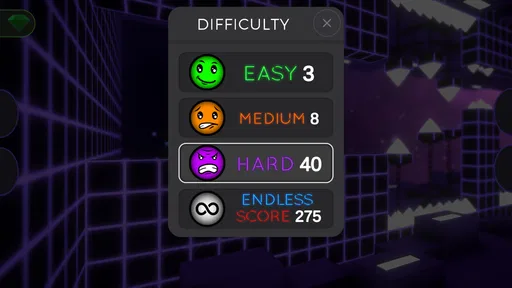
 Analysis by AppCompare
I can see Geometry Jump 3D working best as a quick, shared-phone game: one person tries a jump, hands the device over, and the next person takes a turn. Its tap-to-jump premise is easy to explain without a tutorial, while the timing takes practice, so a younger player and an older one can both enjoy trying to improve. I’d treat it as a casual challenge rather than a game that needs a long, uninterrupted session.
Passing the phone without turning it into a contest
A realistic use is a short wait at home or while travelling: someone plays until a tricky section stops them, then lets another person have a go. The quick restart helps keep that handoff moving, though it can also make everyone want “just one more” attempt. I’d agree on a natural stopping point before starting, especially if several people are waiting for a turn. That keeps the game a light shared activity instead of an accidental screen-time sink.
The game’s simple input is useful on a shared device because there is little to explain before another person can try. The trade-off is that a tap carries a lot of responsibility: timing is the skill, and a mistimed press can end a run. If someone is frustrated by repeating a difficult moment, switching players or taking a short break is more sensible than treating every failure as a reason to keep going.
Keep expectations clear on a shared device
I would make sure everyone knows whose device they are using and who is responsible for any purchases. The game is free to download, with optional in-app purchases priced at $1.99 per item, so it is worth agreeing that nobody should buy anything without the device owner’s permission. That is a straightforward household boundary, not a special feature of the game.
For a phone shared among siblings, I’d also keep turns and personal settings simple: pass the device deliberately, avoid changing another person’s usual setup, and let the owner handle store or account decisions. I wouldn’t assume the game provides separate household profiles or turn-taking tools. The practical arrangement is between the people using the phone, so a parent or device owner can set expectations that fit their household.
How to make short sessions work better
One useful approach is to play with the sound on for a first attempt, then decide whether the music helps you focus or pulls your attention away. Since the game pairs rhythmic electronic music with fast jumps, the soundtrack may make a run feel more engaging, but players who prefer quiet can choose a different moment or listening setup. I wouldn’t rely on the beat as a guaranteed timing guide; the core demand is still paying attention to the obstacles and judging each tap.
Another practical tip is to hold the phone steadily and keep a finger ready rather than gripping the device tightly as the pace rises. That can make repeated attempts less awkward, particularly when passing the phone between players. If a child is taking a turn, an adult can demonstrate the basic tap first and then let the child discover the timing, rather than trying to coach every jump. The point is to make the challenge enjoyable, not to turn a casual game into a test.
Worth Reading Before You Choose

EA SPORTS FC Mobile 26 Is a Bigger Football Game, but It Takes Time

Flipboard Shows What News Apps Must Do Beyond the Feed

Switching to Android Auto Means Rethinking Your Driving Routine

Google Calendar Makes a Crowded Week Easier to Manage

Ludo King Makes the Most of the Minutes Between Plans

Baby Panda World Brings Quick Play to Modern Phones, but Its Game Library Feels Busy
Where it fits among music games
Compared with music games built around matching notes or following a song chart, this one puts the emphasis on jumping through obstacles with a tap. The soundtrack contributes to the mood, but I’d choose it for its reflex challenge rather than for a deep music library or rhythm-game progression. If you want to practise note patterns, perform songs, or make music, a dedicated rhythm or music-making game would be a better fit. If you want a compact arcade-style challenge with music in the background, this is closer to the mark.
It also differs from slower puzzle games: there is less time to plan a move, and more pressure to react at the right moment. That makes it a good option when you want immediate action, but a weaker choice when you’re looking for a calm game to play while distracted. I’d avoid starting a run while carrying on a conversation or doing something that needs your attention; the quick pace rewards focus, not multitasking.
Age, trust, and who may prefer something else
The game is rated Everyone, which makes it broadly suitable for different ages, but that label doesn’t decide whether its repeated timing challenge will suit a particular child. I’d pay attention to how the player reacts when a jump fails. Some people enjoy retrying and gradually improving; others would rather progress through a story or explore at their own pace. The game’s appeal depends more on that difference in temperament than on age alone.
It is developed by F4ntom Games, has an average rating of 3.7 from around 6,700 ratings, and has passed 1 million installs. Those figures suggest that plenty of players have tried it, while the rating is a reminder that its particular mix of repetition and precision will not click with everyone. I’d use that as context, not a promise that a household will share the same opinion.
For someone deciding whether to install it, the practical questions are simple: does the player enjoy quick retries, is the phone owner comfortable with optional purchases, and can the player give the game focused attention? If those answers are yes, the game is easy to sample. If a player needs relaxed pacing, detailed musical interaction, or a more varied kind of activity, I’d look elsewhere rather than expecting this jumping challenge to provide those things.
My household verdict
My recommendation is strongest for people who want a brief reflex game that is easy to pass around and easy to understand. The game is free, rated Everyone, and its current version is 1.1.4; it was released on January 29, 2020, and supports devices running Android 7.1 or later. Those details make it straightforward to judge whether it fits a household’s device and expectations, while the optional purchases are worth discussing before a child plays on someone else’s phone.
I would not make it the default choice for every shared-device moment. Its quick restarts can stretch a short break, and its precision-focused play may frustrate anyone who dislikes repeating a section. But when a few people want to trade turns at a simple, energetic challenge, it has a clear role. I’d give it a try with a sensible time limit and see whether the household enjoys the rhythm of taking turns as much as the jumps themselves.
Ever found yourself tapping away at your phone, craving a game that’s both simple yet maddeningly challenging? Well, I stumbled upon Geometry Jump 3D the other day, and let me tell you, it’s quite the ride. If you’re into games that test your reflexes and keep you on the edge of your seat, this might just be your next obsession.
What’s the Deal with Geometry Jump 3D?
So, what’s Geometry Jump 3D all about? Imagine a world where shapes rule the universe, and your mission is to navigate a tiny geometric block through a series of increasingly complex obstacles. It sounds simple, right? But trust me, it’s anything but! This game is all about timing and precision, and believe me, it’ll have you shouting at your screen more often than you’d care to admit.
A World of Shapes and Colors
The first thing that hit me was the visual delight. The game’s aesthetic is a vibrant blend of sharp geometric shapes and neon colors, which is not only fun to look at but also keeps you engaged. Each level is meticulously designed, and the smooth transitions between different stages are a treat for the eyes. The graphics aren’t just there to look pretty; they play a crucial role in keeping you hooked.
Gameplay That Keeps You Hooked
The gameplay is where Geometry Jump 3D really shines. Your goal is to tap the screen to make your block jump over spikes, pits, and other obstacles. Sounds easy? Think again! The speed and complexity ramp up quickly, and you’ll find yourself needing to develop razor-sharp reflexes. The controls are intuitive, but the game demands precision, which makes it incredibly addictive.
“One more try” becomes your mantra as you attempt to nail that perfect jump.
The Soundtrack You’ll Groove To
Let’s not forget the soundtrack. The music in Geometry Jump 3D is a pumping mix of electronic beats that perfectly complements the fast-paced gameplay. It’s the kind of music that gets your adrenaline going and makes each leap and bound more thrilling. Honestly, I found myself bobbing my head to the rhythm more than once!
Why It’s So Addictive
What makes Geometry Jump 3D so addictive? It’s the perfect blend of simplicity and challenge. Each level presents a new challenge that requires quick thinking and even quicker fingers. Plus, the instant restart after a failure means there’s no waiting around, just one more attempt to get it right. This immediacy makes it hard to put down, as you always feel like you’re so close to beating your previous record.
Is It Worth Your Time?
In a word, absolutely. If you’re someone who enjoys games that test your skills and offer a rewarding challenge, then Geometry Jump 3D is a must-try. It’s not just about passing the time; it’s about honing your reflexes and pushing yourself to be better with each level.
So, if you’re ready for a game that’s as frustrating as it is fun, give Geometry Jump 3D a shot. Just remember, it’s not just a game; it’s a test of your patience and skill. And who knows, you might just find it to be the perfect way to unwind after a long day.
Pros
- Engaging 3D graphics enhance gameplay.
- Challenging levels keep users entertained.
- Simple controls make it easy to learn.
- Regular updates with new levels.
- Offline mode available for on-the-go play.
Cons
- Ads can be intrusive at times.
- Limited customization options for characters.
- Difficulty spikes may frustrate beginners.
- Requires frequent in-app purchases.
- No multiplayer mode for competitive play.
FAQs for Geometry Jump 3D
What is Geometry Jump 3D about?
Geometry Jump 3D is a fast-paced platformer game where players navigate through increasingly challenging levels filled with obstacles. The goal is to jump, dodge, and maneuver through geometric landscapes while collecting points. The game offers vibrant graphics and a catchy soundtrack, making it addictive for players who enjoy quick reflex challenges.
Is Geometry Jump 3D free to play?
Yes, Geometry Jump 3D is free to download and play. However, it features in-app purchases that allow players to buy power-ups, remove ads, or unlock special levels. These purchases are optional and not required to enjoy the full experience of the game, providing flexibility for all types of players.
What are the main features of Geometry Jump 3D?
Geometry Jump 3D offers a variety of features including multiple levels with increasing difficulty, vibrant 3D graphics, and an engaging soundtrack. It also includes customizable characters and a leaderboard to compete with friends. The intuitive controls make it easy to pick up, yet challenging to master, providing endless hours of entertainment.
Does Geometry Jump 3D require an internet connection?
Geometry Jump 3D does not require an internet connection to play, making it ideal for offline gaming. However, certain features such as leaderboard updates and in-app purchases will need internet access. This makes it convenient for players who want to enjoy the game on the go without worrying about connectivity.
Can I play Geometry Jump 3D on multiple devices?
Yes, Geometry Jump 3D supports cloud saving, allowing you to sync your progress across multiple devices. Simply log in with the same account on each device to continue where you left off. This feature ensures that your progress is always up-to-date, whether you switch between a phone and a tablet.


